




Qube Money offers paid plans with a free trial and a host of useful features, which makes downloading this app a no-brainer. Budgeting doesn’t have to be complicated or unpleasant with this new budgeting app.
The cash envelope system has been around forever. You put your grocery money in an envelope marked “groceries,” and when it’s empty, you’re done buying groceries.
Dave Ramsey made it famous with his Envelope System, and it works because you decide what every dollar is for before you spend it.
But what if you pay some of your expenses online? Or what if you’re an avid online shopper, like me? Physical cash can certainly seem archaic and inconvenient in those instances.
That’s the gap Qube Money fills.
Heads up if you read about it a while back: Qube doesn’t send you a debit card anymore. The app is now called Qube+, it costs $14 a month after a 15-day free trial, and it works with the bank account and credit cards you already have.
Bottom line: Qube+ is a solid pick if you overspend and want the envelope method without carrying cash, especially as a couple. If you mostly want to track net worth or cancel subscriptions, there are better fits further down.
What Is Qube+?
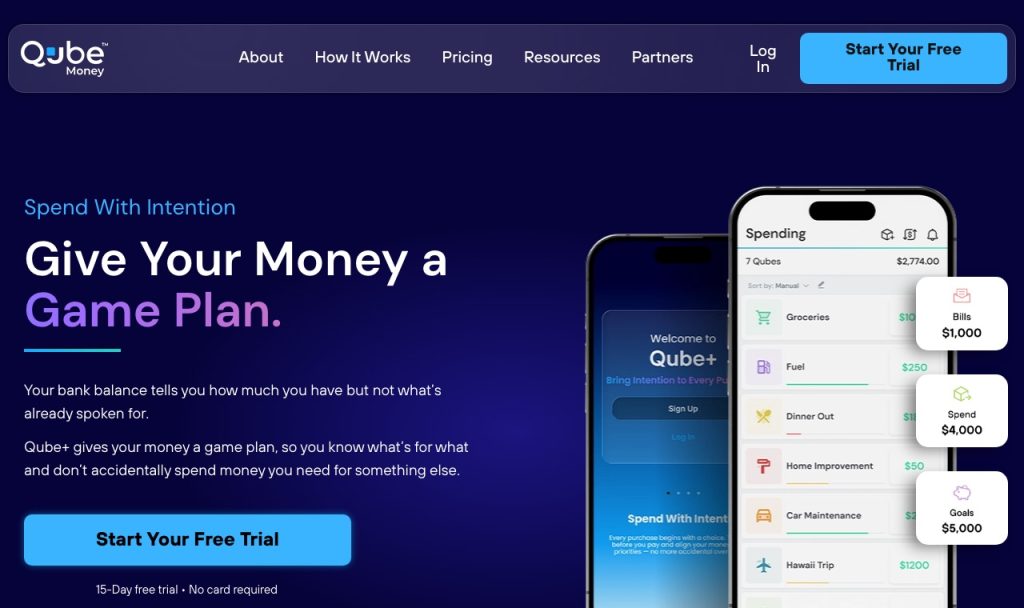
Qube+ is a budgeting app built around digital envelopes. Qube calls them qubes.
You connect your checking account and credit cards, then split your money into qubes for Bills, Spend and Goals. Instead of one big bank balance, you see what’s already spoken for, what still needs money set aside, and what’s actually free to spend.
Your money never leaves your bank. Qube+ isn’t a bank, it doesn’t hold or move your money, and it doesn’t pay your credit card bills for you. It’s a spending plan that sits on top of the accounts you already use, so you keep your bank and keep earning your credit card rewards.
What Happened to the Qube Debit Card?
The original product, Qube Checking, came with a Qube-issued Visa debit card. You’d pick a qube in the app, then swipe the Qube card, and the purchase came out of that qube.

Qube+ drops the card. Qube’s FAQ is direct about it: Qube+ doesn’t issue a debit card or a credit card. You pick your qube, then pay with whatever card you normally use.
If you already had a Qube Checking account, Qube has how-to videos for migrating your account (and your family members’ accounts) over to Qube+.
How Does Qube+ Work?
Setup is pretty quick. You connect your accounts through Plaid, and Qube’s FAQ says that during the beta you can link one checking account and up to 10 credit cards.
Then you build your plan. Smart Setup suggests qubes and amounts for your bills, everyday spending and goals, or you can upload a CSV or build it by hand. What the qubes are for is completely up to you: groceries, rent, a vacation, whatever.
New deposits land under “Fill your qubes,” and you decide where that money goes. Don’t have enough to fill everything yet? That’s fine. Qube suggests funding what’s coming up next first.
Pre-Qubing at checkout
This is the part that makes Qube different from most budgeting apps. When you’re about to buy something, you do three things:
- Open the Qube app.
- Tap the qube you’re spending from, enter the amount and tap Pre-Qube. Say your Groceries qube has $500 and the total is $100. It drops to $400 right away.
- Pay with the card or account you normally use.
When the purchase posts at your bank, Qube+ matches it to your Pre-Qube and clears it. A Pre-Qube that never matches expires after up to 7 days.
Forget to do it? Auto-Qube runs each evening and matches the purchases it’s confident about. Anything it isn’t sure about waits for you under Match purchases. Pre-Qubing is optional, but it’s the only way your qubes stay accurate in real time, since deposits and some transactions can take a few days to show up.
Using credit cards with Qube+
Every credit card you link gets its own Bill qube. When you Pre-Qube or match a card purchase, the money gets set aside in that Bill qube, so it’s there when the statement comes.
Two catches. Qube+ doesn’t pay the card for you, so you still make that payment yourself (Qube recommends paying from the checking account you linked). And it only sets money aside for new purchases after you connect the card. Any balance you already carry stays separate, and you keep paying that down on your own.
How Much Does Qube Money Cost?
There’s no free plan anymore.
Qube+ Premium is $14 a month and Family is $21 a month, and paying for the year knocks 25% off.
| Plan | Monthly | Paid yearly | Who it covers |
|---|---|---|---|
| Qube+ Premium | $14 | $126 ($10.50 a month) | You plus one companion, like a spouse or partner |
| Qube+ Family | $21 | $189 ($15.75 a month) | Everything in Premium plus up to 5 kid accounts |
Both plans start with a 15-day free trial. No card needed to start it.
Premium gets you unlimited qubes, a checking account connection, linked credit cards and a shared companion account at no extra cost. Family adds up to five kid accounts, each with unlimited qubes of their own, and you can see into every kid account.
The trial starts when you create your account. If you never add a payment method, transaction syncing just pauses when the 15 days are up. One thing to know before you pay.
Subscriptions are non-refundable, and there’s no prorated refund if you cancel partway through a month or a year. You keep access until the end of the period you paid for.
Is $14 a month worth it?
If Qube keeps you from blowing $50 here and $50 there, it pays for itself. If you’d use it twice and forget about it, start monthly instead of paying $126 up front.



Qube Money Pros and Cons
Pros
- You decide what money is for before you spend it, not after.
- Works with the bank and credit cards you already have, so you keep your card rewards.
- A partner is included on Premium at no extra cost.
- Credit card spending gets set aside automatically in a Bill qube.
- 15-day free trial with no card required.
Cons
- No free plan, and subscriptions are non-refundable.
- Still in beta: one checking account, and savings accounts can’t be connected yet.
- Apple Card can’t be connected.
- You can’t add, edit or split a transaction by hand.
- Deposits usually take 2 to 3 business days to show up, so qubes can run negative while you wait.
Is Qube Money Good for Couples?
Yes, and that’s really who it was built for.
Couples who fight about money usually aren’t missing information. They’re missing a plan they both agreed to before somebody swiped.
Qube’s About page says founder Shane Walker was inspired by a couple he coached. The husband earned $250,000 a year, they had little to show for it, money became a source of heated conflict, and the marriage ended in divorce. Qube is his answer to that: both of you work from the same qubes, so you can both see what’s covered before either of you buys anything.
To add your partner, you send them an invite from your profile and they join as an authorized user on your account. One tip from Qube’s FAQ: if Plaid says your name doesn’t match a joint account, try linking it through the other spouse’s login, since banks often list one person as the primary owner.
Comparing a few options? Our list of the best budget apps for couples puts Qube next to the others.
Is Qube Money Safe?
Qube+ connects through Plaid with a read-only token. That lets it see your balances and transactions but never move your money, and Qube says your bank login is never stored or shared.
And since Qube+ never holds your money, there’s no Qube account balance to worry about. Your cash stays at your bank the whole time.
Qube Money Alternatives
Qube is built for one job: spending on purpose. If that’s not your main problem, one of these might fit better. For the full lineup, see our list of the best budgeting tools.
| App | Price | Try it free | Best for |
|---|---|---|---|
| Qube+ | $14 a month | 15 days, no card | Envelope-style spending |
 Monarch Money | $99.99 a year (Core) | 7 days | Couples and net worth |
 Rocket Money | Free, Premium $7 to $14 a month | Free plan | Canceling subscriptions |
 YNAB | $109 a year | 34 days | Strict zero-based budgeting |
Prices are each app’s yearly or monthly list price.
Monarch Money
Monarch Money pulls every account you own into one place (bank accounts, cards, loans, investments) and builds your budget and net worth from it. Core is $99.99 a year after a 7-day free trial, and you can invite a partner at no extra cost. If you share money with someone and want the whole picture, not just spending, Monarch is the stronger pick. More in our Monarch Money review.
Rocket Money
If the money leak is subscriptions you forgot about, Rocket Money finds the recurring charges in your accounts on its free plan. Premium runs $7 to $14 a month and adds more on top. It’s cheaper than Qube if all you want is to stop paying for stuff you don’t use.
YNAB
YNAB is the closest thing to Qube in spirit: every dollar gets a job before you spend it. It’s $14.99 a month or $109 a year, with a 34-day free trial. The big difference is timing: YNAB has you budget money that’s already arrived, while Qube works in the moment with Pre-Qubing at checkout. Our YNAB vs Monarch breakdown covers how it stacks up.
Cleo
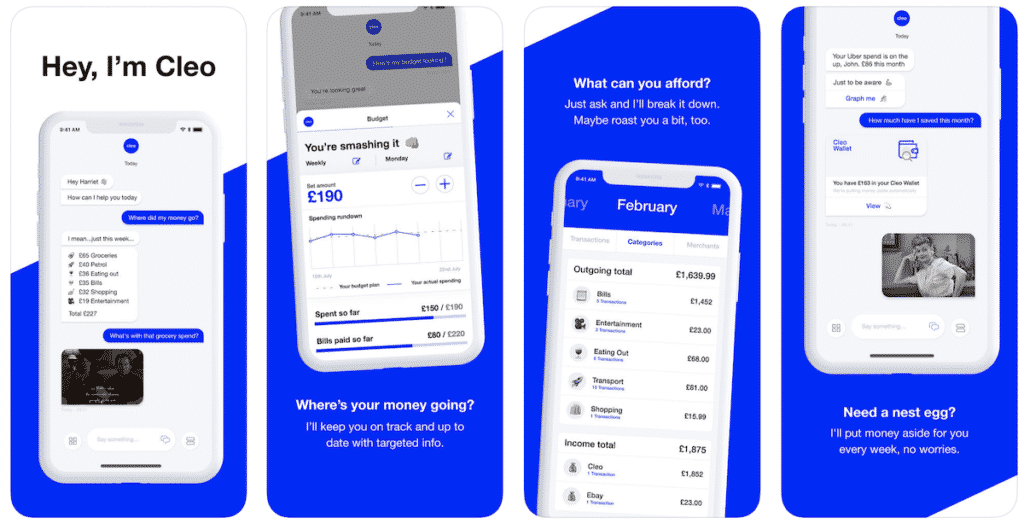
Cleo is a money assistant you talk to. You ask it things like “How much have I spent on Ubers this month?” and it tells you, with a little sass when you’re overspending. It’s more of a nudge than a plan, so it suits you if a full envelope system feels like too much. Read our Cleo review for the details.
The Verdict
Qube Money brings the cash envelope system to the checking account and cards you already use. It goes after the problem most budgeting apps skip: the moment you’re about to spend.
It’s not perfect. There’s no free plan, it’s still a beta with one checking account, and without the card, nothing stops you from swiping before you Pre-Qube. You have to build that habit yourself.
But if you and your partner keep asking where the money went, it’s worth the 15-day trial. It costs nothing to find out, and you don’t need a card to start.
Qube Money offers paid plans with a free trial and a host of useful features, which makes downloading this app a no-brainer. Budgeting doesn’t have to be complicated or unpleasant with this new budgeting app.
Qube Money FAQ
No. Qube+ doesn’t issue a debit card or a credit card. The original Qube Checking account came with a Qube debit card, but Qube+ works with the bank account and credit cards you already use.
Qube+ Premium is $14 a month or $126 a year and covers you plus one companion, like a spouse or partner. Family is $21 a month or $189 a year and adds up to 5 kid accounts. Both start with a 15-day free trial, no card required. There’s no free plan.
No. Qube+ isn’t a bank and doesn’t hold or move your money. It connects to your bank through Plaid with read-only access, so your money stays where it is.
Not yet. During the beta you can connect one checking account and up to 10 credit cards. Qube says savings account support is planned, and Apple Card can’t be connected right now.
No. Qube+ subscriptions are non-refundable and there’s no prorated refund. If you cancel, you keep access until the end of the month or year you already paid for.

